
The short answer
Yes, there are free options, including PocketTutor's Basic plan. Choose according to the work you want help with: making study materials from your notes, talking through a question, or practising a topic for your state and year level. A free starting point does not necessarily mean ongoing unlimited use, so check the allowance and age requirements before signing up.
This guide is published by PocketTutor and compares the features and conditions each provider publishes. Competitor pages were checked on 3 November 2026. Use the comparison to find an option for your course and the activity you want to try. Unconfirmed details stay marked for further checking.
Compare the free starting points
| App | What its published features focus on | Free access | Australian curriculum detail | Paid price and eligibility |
|---|---|---|---|---|
| PocketTutor | Explanations and practice for Australian school students | Basic: 10 messages, 2 guided sessions and 3 quizzes a day. No credit card | State and territory syllabus support, with year-level selection | $19/month billed annually, or $228 a year. Monthly billing is $29. See the account-age guidance below. |
| Studley | Turning uploaded course materials into study sets and tutor lessons | The free panel lists 1 study set, 5 AI tutor uses and “2 solves, then 1 per day”, beneath “Resets every week” | The tutor uses the materials you upload. Specific Australian state coverage was not verified | A$11.67/month billed A$139.99 per year, as displayed on https://www.studley.ai/pricing (checked 3 November 2026). Under-18s need a parent or guardian's permission and involvement under its terms. |
| Turbo AI | Notes, flashcards and quizzes from study materials | Its homepage describes a free tier, without numerical allowances in the page checked | Specific Australian state coverage was not verified | The US App Store (USD) lists monthly in-app purchase options at $19.99 and $14.99: https://apps.apple.com/us/app/turbo-ai-learn-faster/id6502794561 (checked 3 November 2026). Applicable checkout offer remains unconfirmed. Minimum age is 16, or a higher applicable local minimum. Users aged 16 to 17 need parental consent and supervision. |
| Astra AI | Photo-based questions, step-by-step explanations and Exam Prep | Free daily use has cost-based limits shown in the account. No card is required to start | Its developer listing describes curriculum by country. Individual Australian state coverage was not verified | US App Store listing (USD): $8.00/week, $24.00/month or $119.99/year, as listed at https://apps.apple.com/us/app/astra-ai-study-exam-prep/id6751030141 (checked 3 November 2026). These are original US-store prices. Its terms require parental approval or contracting where a minor lacks legal capacity. Check feature-specific restrictions. |
The competitor rows reflect the pages checked on 3 November 2026. Sources: Studley, https://www.studley.ai/ai-tutor and https://www.studley.ai/pricing. Turbo AI, https://www.turbo.ai/ and https://www.turbo.ai/terms-of-service. Astra, https://astra-ai.co/, https://app.astra-ai.co/terms-conditions and https://apps.apple.com/us/app/astra-ai-study-exam-prep/id6751030141. PocketTutor pricing: https://getpockettutor.com.au/pricing. Curriculum information: https://getpockettutor.com.au/subjects.
“Not verified” means this review did not establish the detail. It does not mean the app lacks that feature. Keep the original currency beside any price you compare, and check whether payment is collected monthly or for a whole year.
Start with the task you need help with
Before trying another app, write down what you want to do. “Make revision questions from these notes” is a different request from “help me understand why my algebra method went wrong”. That makes it easier to judge whether a free plan is useful for your work.
Check four things:
- Course fit. Look for your subject and year level within the relevant state syllabus. If the tool works from uploads, choose the relevant class materials and check that its explanation follows them.
- Allowances. Find out what counts as a message or session, when the allowance resets, and whether your saved work remains accessible.
- Your part in the work. Try explaining a step yourself before asking for feedback. After a session, attempt a similar question without the app.
- Eligibility. Read the service's terms with a parent if needed. An App Store content rating is not enough to establish the age at which you can create an account.
You do not have to test every feature. Begin with one topic and decide whether the explanations make sense alongside what your teacher has taught you. Keep your notes beside you so you can check any doubtful answer.
When Studley may fit
Studley describes an AI tutor built around the materials a student uploads. Its page accepts materials such as PDFs or recordings, then connects the resulting lesson with study tools such as flashcards and quizzes. That makes it worth considering when you already have course materials and want to organise revision around them. Source: https://www.studley.ai/ai-tutor (checked 2 November 2026).
For example, you could assess whether a generated study set stays faithful to a chapter you have already covered. Compare a few questions with the original material before relying on the set. This is a suggested checking routine, not a claim that the app has been tested on your course.
Is Studley free for students?
Yes. Studley's free pricing panel lists 1 study set, 5 AI tutor uses and “2 solves, then 1 per day” under a weekly-reset heading. Check the displayed allowance for each activity rather than assuming they all reset daily. Its Australian page lists Unlimited at A$11.67/month billed A$139.99 per year: https://www.studley.ai/pricing (checked 3 November 2026).
Studley's terms require under-18s to have parental permission and a parent or guardian involved in agreeing to the terms: https://www.studley.ai/terms (checked 3 November 2026).
If the main thing you need is practice organised around your Australian state and year level, PocketTutor is another option to try. Judge the explanations against the same class topic rather than assuming that either app is best for every task.
When Turbo AI may fit
Turbo AI, formerly TurboLearn, describes tools that turn study materials into notes, flashcards and quizzes. Its homepage shows uploads such as PDFs, videos and recordings. Consider it if your first priority is working with a collection of material you already have. Source: https://www.turbo.ai/ (checked 3 November 2026).
Before uploading, check that you are permitted to share the material with the service. Leave out personal details, and ask your school about recordings or class materials if you are unsure. You can make the same check with any study app.
Is there a free version of Turbo AI?
Yes. Turbo AI's homepage describes a free tier covering note generation, flashcards and quizzes. The page checked did not give numerical free-use limits, so this guide cannot promise how many uploads or activities you will get. Read the current allowance in the service before planning your revision around it: https://www.turbo.ai/ (checked 3 November 2026).
The US App Store (USD) lists monthly in-app purchase options at $19.99 and $14.99: https://apps.apple.com/us/app/turbo-ai-learn-faster/id6502794561 (checked 3 November 2026). These are listed purchase options; this review has not established which applies to a particular new account.
Turbo's terms set a minimum age of 16, or a higher applicable local minimum. Users aged 16 to 17 need parental consent and supervision: https://www.turbo.ai/terms-of-service (checked 3 November 2026). A parent's involvement does not remove the minimum-age requirement.
When Astra AI may fit
Astra offers photo-based questions and step-by-step explanations, alongside Exam Prep. Its developer's App Store description lists 14 subjects and says lessons can follow a country's curriculum. Those are the developer's published descriptions. They do not establish coverage of each Australian state course. Sources: https://astra-ai.co/ and https://apps.apple.com/us/app/astra-ai-study-exam-prep/id6751030141 (checked 3 November 2026).
Astra's homepage offers a free start without a card. That is a reason to inspect what the free access includes, rather than assume it provides an unlimited ongoing plan. Its terms say free daily use has cost-based limits displayed in the account, and paid packages also have limits. Its US App Store listing (USD) shows $8.00/week, $24.00/month and $119.99/year at https://apps.apple.com/us/app/astra-ai-study-exam-prep/id6751030141 (checked 3 November 2026). These are the original US-store prices. The free and paid limits are described in its terms. Sources: https://app.astra-ai.co/terms-conditions and https://apps.apple.com/us/app/astra-ai-study-exam-prep/id6751030141 (checked 3 November 2026).
Astra advertises weekly parent progress reports. Its terms require parental approval or contracting where a minor lacks legal capacity, and allow feature-specific age restrictions. Read these conditions together rather than using the store's content rating as an account rule: https://astra-ai.co/ and https://app.astra-ai.co/terms-conditions (checked 3 November 2026).
For senior subjects, ask a specific question about your course. The relevant certificate may be the HSC, VCE, QCE, SACE, WACE, TCE, ACT Senior Secondary Certificate or NTCET. A general statement about Australian curriculum alignment should not substitute for checking the course you study.
Where PocketTutor fits
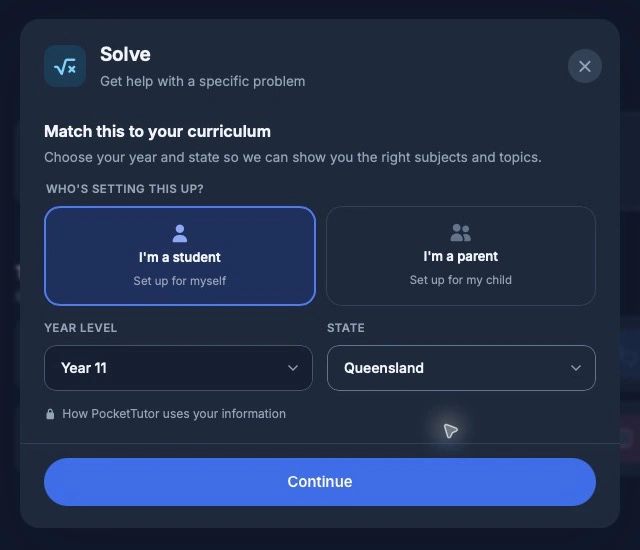
PocketTutor is designed for Australian school students from Kindy to Year 12. Its subject guidance describes support for the Australian Curriculum and state and territory syllabuses. Start by choosing your state and year, then bring a topic or question from class: https://getpockettutor.com.au/subjects and https://getpockettutor.com.au/learn/senior-secondary/ai-study-guide.
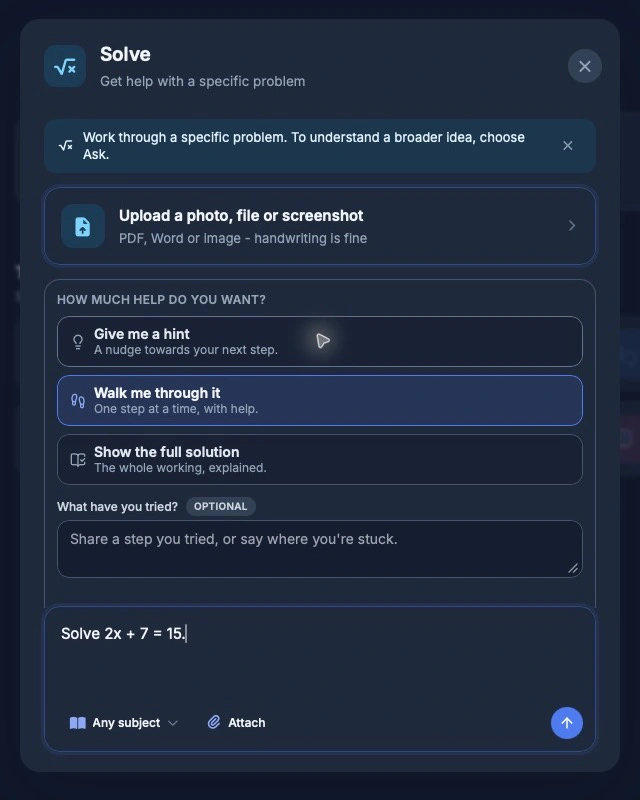
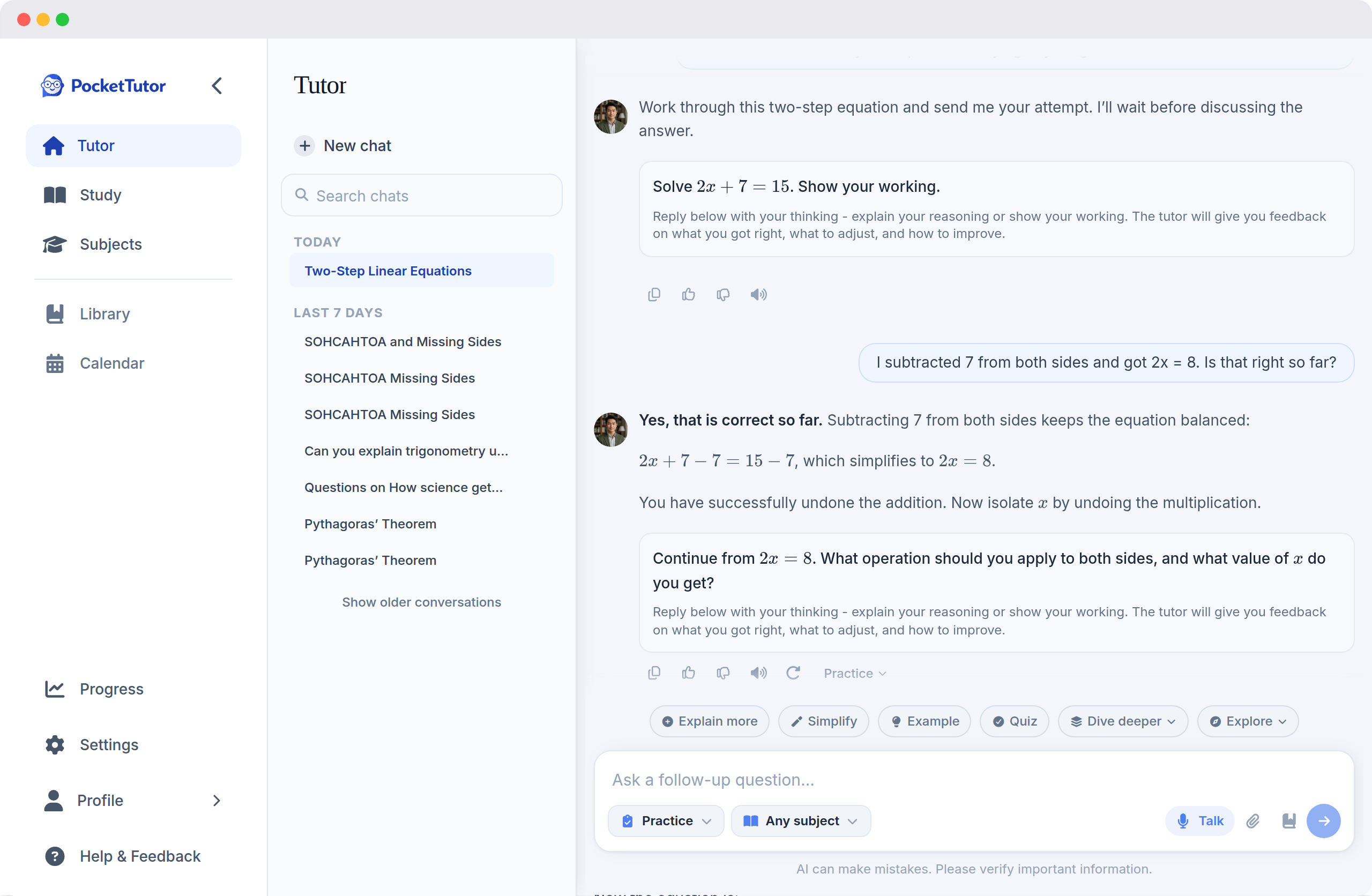
In Solve, you choose the level of support from three options: “Give me a hint”, “Walk me through it” and “Show the full solution”. The last option provides a full worked solution. Practice gives questions and feedback, while Check gives feedback on your own work. Choose the support you need, do your own working and keep authorship of anything you submit. The choices were checked in the live app at https://app.pockettutor.io/ on 2 November 2026; mode descriptions are at https://getpockettutor.com.au/modes.
Basic includes 10 messages, 2 guided sessions and 3 quizzes a day. Plus is $19/month billed annually, or $228 a year. Month-to-month billing is $29. Start with Basic if you want to see whether the approach suits you before considering payment: https://getpockettutor.com.au/pricing.
AI can make mistakes. Check important explanations against class notes, prescribed texts or your teacher.
Showing this to a parent
Tell your parent which topic you want help with and what you plan to try. You could show them the free allowance and one example of your own working, then discuss whether the feedback was useful. There is no need to begin with a paid plan.
PocketTutor's parent dashboard includes information about study activity and quiz performance. Basic has limited progress tracking. Plus adds more detail. It shows activity rather than full chat transcripts. Use it to start a conversation about what you are learning: https://getpockettutor.com.au/parents.
Account setup also matters. PocketTutor's published guidance allows Years 9 to 12 to create their own account, asks Years 7 and 8 to confirm they are at least 13, and directs any under-13 student to a parent-managed profile. Read the full guidance together: https://getpockettutor.com.au/learn/for-parents/is-ai-tutoring-safe-for-children.
Keep your schoolwork your own
Check your teacher's instructions before using AI for schoolwork, especially assessed work. Use it only in the ways permitted for that task, keep your own working, and follow any acknowledgement requirements. PocketTutor's student guide discusses learning with AI without handing over authorship: https://getpockettutor.com.au/learn/for-students/ai-homework-without-cheating.
Frequently asked questions
Which free AI study app is best for Australian high school?
There is no single winner established by this comparison. Start with your course, the task you need help with and the allowance available. PocketTutor is one option for state-aware explanations and practice. The other apps have published tools worth considering for working with your materials.
Does uploading class notes prove an app follows my syllabus?
No. Uploads give you a source to compare the response against, but you should still check whether the method and detail fit the topic. Ask your teacher when an explanation conflicts with class guidance.
Can I use a free plan throughout the school year?
Check the plan's current terms and reset rules. A first free study set, a daily allowance and an introductory offer are different arrangements. This guide does not treat them as interchangeable or promise that a plan will stay unchanged.
Can an app rating tell me whether I can sign up?
Read the service's own age and parental-consent terms as well as the store listing. Astra's US listing shows a 9+ content rating, but that alone does not establish contractual eligibility: https://apps.apple.com/us/app/astra-ai-study-exam-prep/id6751030141 (checked 3 November 2026).
How should I decide whether to pay?
First see whether the free access meets the task you actually need help with. If you consider paying, check the amount charged today, the billing period and cancellation terms with your parent.
Try PocketTutor's free plan, with no credit card, at https://getpockettutor.com.au. Parents can read more at https://getpockettutor.com.au/parents.
Sources
- https://app.pockettutor.io/ - checked 2 November 2026 in the live guest interface. Exact support-choice labels; no real student account or activity used.
- https://getpockettutor.com.au/screenshots/learn-practice-turn-light.webp - checked 2 November 2026 by live retrieval and visual inspection. Existing public demo feedback image.
- https://www.studley.ai/ai-tutor - checked 2 November 2026 via indexed first-party page. Free first study set and tutor features.
- https://www.studley.ai/pricing - checked 3 November 2026 in the rendered page. Australian displayed price and free-panel wording.
- https://www.studley.ai/terms - checked 3 November 2026. Terms updated 20 October 2026.
- https://www.turbo.ai/ - checked 3 November 2026. Features, former name and published free-tier description.
- https://apps.apple.com/us/app/turbo-ai-learn-faster/id6502794561 - checked 3 November 2026. US-store monthly purchase entries in USD; eligibility for each offer remains unverified.
- https://www.turbo.ai/terms-of-service - checked 3 November 2026. Minimum age and parental involvement.
- https://astra-ai.co/ - checked 3 November 2026. Free start, photo questions, Exam Prep and parent reports.
- https://app.astra-ai.co/terms-conditions - checked 3 November 2026. Terms updated 28 October 2026. Usage limits and parental requirements.
- https://apps.apple.com/us/app/astra-ai-study-exam-prep/id6751030141 - checked 3 November 2026. Developer description and content rating. US prices only. Australian purchase offers require a separate check.
- https://getpockettutor.com.au - checked 2 November 2026. Product and free-plan CTA.
- https://getpockettutor.com.au/pricing - checked 3 November 2026. Allowances and billing.
- https://getpockettutor.com.au/subjects - checked 2 November 2026. Curriculum support.
- https://getpockettutor.com.au/learn/senior-secondary/ai-study-guide - checked 2 November 2026. State certificates.
- https://getpockettutor.com.au/modes - checked 2 November 2026. Ways to learn.
- https://getpockettutor.com.au/parents - checked 3 November 2026. Parent dashboard.
- https://getpockettutor.com.au/learn/for-parents/is-ai-tutoring-safe-for-children - checked 3 November 2026. Account setup.
- https://getpockettutor.com.au/learn/for-students/ai-homework-without-cheating - checked 2 November 2026. Schoolwork and authorship guidance.
