
The short answer
There is no single best AI tutor for every child. Start with your child's year level and state syllabus, then check how the tool supports their own working, its age and privacy conditions, what parents can see and the full family cost. Use a free plan or trial to assess the fit before paying, provided you understand when the trial ends and whether a charge follows.
This guide is published by PocketTutor. It compares providers' published features, account conditions and prices, checked on 2 and 3 November 2026. Use the checklist to narrow the options for your child's course and the help they want.
What are you choosing an AI tutor to do?
An AI tutor is software that can explain topics, ask practice questions or respond to a student's work. The label does not tell you exactly how each product behaves. For example, a tool may offer both worked explanations and a practice mode that waits for the student's attempt. PocketTutor describes its approaches at https://getpockettutor.com.au/modes.
Write down the help your child wants: perhaps discussing a confusing class topic or receiving feedback on their own reasoning. Then try that task together. A long feature list matters less than whether your child can use the relevant feature appropriately and understand its explanation.
AI can make mistakes. Check important information against class notes, prescribed texts or a teacher, even when an answer looks convincing. PocketTutor's explanation of AI tutoring and general chatbots discusses this limitation: https://getpockettutor.com.au/learn/for-parents/ai-tutor-vs-chatgpt.
Six questions to ask before subscribing
1. Does it cover the right year level and course?
Look for the actual subject and year, then the relevant state syllabus. A broad claim about Australian Curriculum alignment does not by itself answer whether a particular senior course is covered. Compare a sample explanation with the course materials your child already uses.
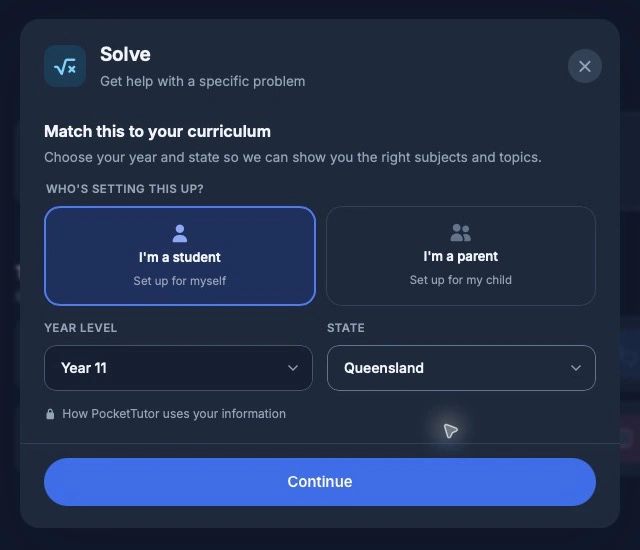
For Years 11 and 12, the certificate may be the HSC, VCE, QCE, SACE, WACE, TCE, ACT Senior Secondary Certificate or NTCET. PocketTutor's senior study guide explains its state-aware approach: https://getpockettutor.com.au/learn/senior-secondary/ai-study-guide. Ask each provider about the exact course before buying for exam preparation.
2. What does your child do during a session?
Ask your child to attempt a question before seeking help, explain the next step aloud, then try a related question independently. Use the session to inspect the explanations and how the tool responds to an attempt.
Check how feedback responds to an error and whether your child can ask about a step they do not understand. Keep assessed work within the teacher's rules. Your child should retain authorship rather than submit generated work as their own. The Australian Framework for Generative AI in Schools covers privacy and academic integrity, with human accountability. It is guidance, not certification of an app: https://www.education.gov.au/schooling/resources/australian-framework-generative-artificial-intelligence-ai-schools.
3. What can parents actually see?
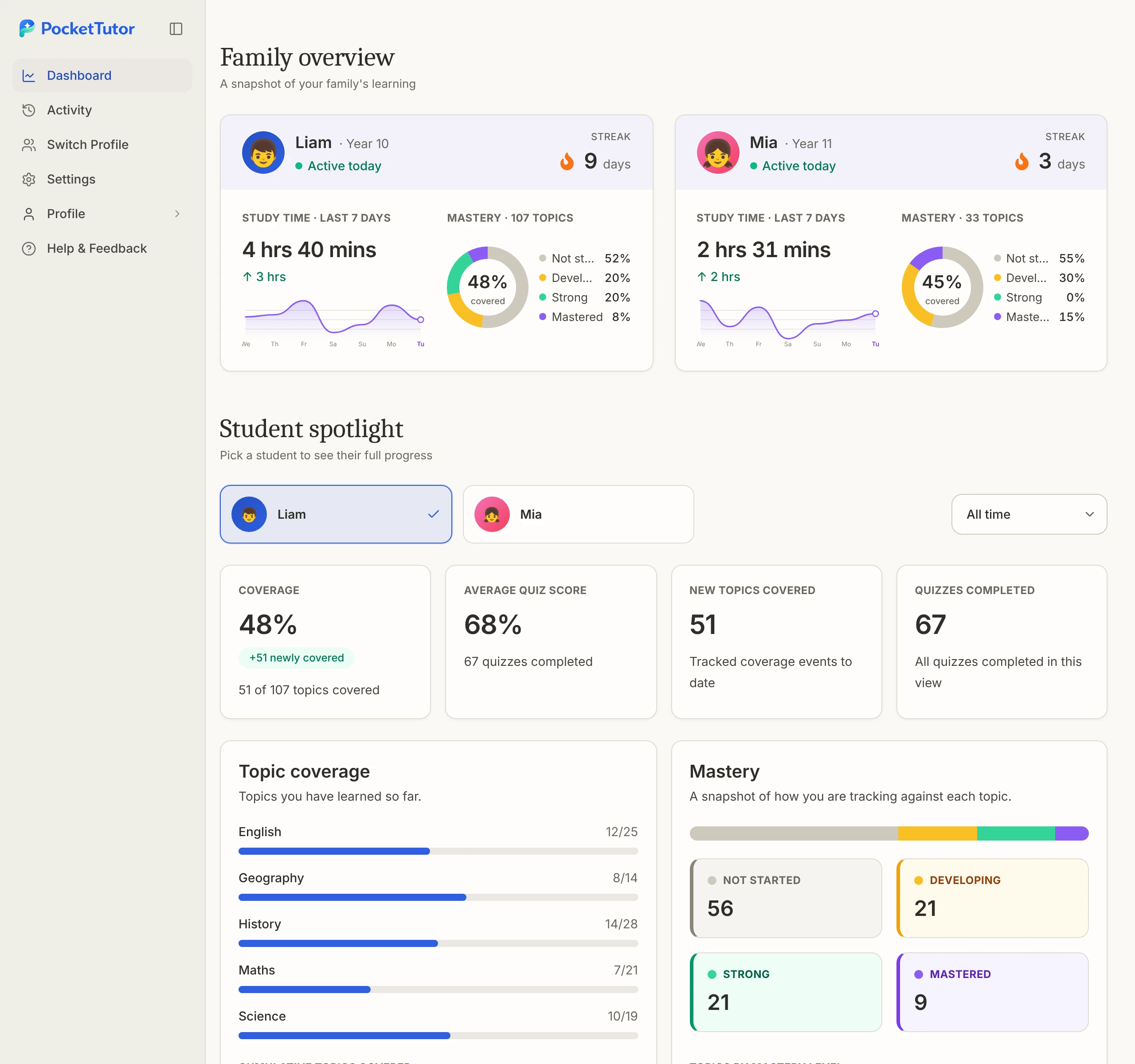
“Parent dashboard” can cover different information. Ask whether it reports activity, quiz responses or topic indicators, and whether it provides conversation access. Find out which features belong to the free plan and which require payment.
For PocketTutor, parents see study activity and progress rather than full chat transcripts. Use the app-generated topic indicators to ask what your child worked on and what they want to discuss. Its parent features are explained at https://getpockettutor.com.au/parents and https://getpockettutor.com.au/learn/for-parents/is-ai-tutoring-safe-for-children.
4. Is the account arrangement appropriate for their age?
Check the provider's age requirements and the role it gives the parent. A product's school-year range is not necessarily the same thing as permission for a child to register independently. Read its content boundaries and reporting process as well.
For a younger child, consider a parent-led trial in which you stay involved and can stop when the activity is no longer useful. No advertised safeguard establishes that unsuitable or incorrect output is impossible. eSafety's advice on chatbots and companions discusses risks such as relationship simulation. That advice supports checking the tool's role and staying involved, rather than assuming all tutors carry identical risks: https://www.esafety.gov.au/newsroom/blogs/ai-chatbots-and-companions-risks-to-children-and-young-people.
5. What happens to information your child shares?
Read the privacy notice before uploading schoolwork or opening an account. Check what is collected, who processes it, whether it is used for model training and how deletion works. Use an example with personal information removed when trying an upload feature.
PocketTutor states that its AI providers do not train on customer data and that processing takes place overseas, mainly in the United States. Australian ownership should not be read as Australian-only data storage: https://getpockettutor.com.au/learn/for-parents/is-ai-tutoring-safe-for-children.
6. What will your family actually pay?
Compare the amount collected at checkout, not just the monthly equivalent. Check the ordinary renewal price after any introductory offer, the charge for each child and whether a trial automatically becomes paid access. Keep a note of the cancellation deadline if there is one.
An annual plan can cost less per month while requiring a larger payment upfront. Choose the billing arrangement that suits your circumstances, and confirm the cancellation terms before paying. A low price does not establish whether a product fits your child's needs.
Australian options compared
These tables describe the providers' own claims at the time of checking, 2 and 3 November 2026. A missing detail means this review has not established it, rather than that the feature is absent.
| Provider | Published year levels and subjects | Curriculum wording and parent features |
|---|---|---|
| PocketTutor | Kindy to Year 12, with a subject catalogue | Australian Curriculum and state/territory syllabus support. Parent activity and progress dashboard. Basic tracking is limited, Plus adds detail. |
| SubjectMate (checked 3 November 2026) | Years 3 to 12. One-subject or all-subject plans | State-curriculum positioning and a parent dashboard. Check the exact senior course. |
| BrightPath (checked 3 November 2026) | K to Year 12, with a maths and English focus plus other lesson content | Describes Australian Curriculum v9 alignment and a parent dashboard. Check the specific senior course. |
Sources, checked 2 and 3 November 2026: PocketTutor https://getpockettutor.com.au/subjects and https://getpockettutor.com.au/parents; SubjectMate https://subjectmate.com.au/ and https://subjectmate.com.au/senior; BrightPath https://brightpath.school/ and https://brightpath.school/pricing.html.
| Provider | Free access or trial | Published price and family conditions |
|---|---|---|
| PocketTutor | Ongoing Basic plan with daily limits, no credit card | AUD $19/month billed annually ($228 a year), or $29 month to month. Extra children cost $10/month each, billed annually, or $15/month on monthly billing. |
| SubjectMate (checked 3 November 2026) | Seven-day trial, card required | One child: Focused Support (one subject) A$29/month, or Complete Support (all subjects) A$39/month. Annual billing: A$23/month billed A$276/year, or A$31/month billed A$372/year, respectively. Family Support (all subjects for each child): A$69/month for two children, A$89/month for three or A$109/month for four. These are total family prices. Annual family billing: A$55/month billed A$660/year for two children; A$71/month billed A$852/year for three; A$87/month billed A$1,044/year for four. All prices are AUD and include GST. Annual plans are paid upfront. https://subjectmate.com.au/plans (checked 3 November 2026). Confirm the current price at checkout. |
| BrightPath (checked 3 November 2026) | 14-day trial, card required. Becomes paid unless cancelled before the end | Standard monthly rates: A$64.75 primary or A$86.45 secondary, https://brightpath.school/pricing.html (checked 3 November 2026). The same page offers the first three monthly cycles at half price (checked 3 November 2026). Pax has a 20-question daily limit. Confirm the current price at checkout. |
Prices at the time of checking, 2 and 3 November 2026. Sources: https://getpockettutor.com.au/pricing, https://getpockettutor.com.au/parents, https://subjectmate.com.au/ and https://brightpath.school/pricing.html. Trial conditions: https://subjectmate.com.au/faq.html and https://brightpath.school/terms.html. Confirm the amount due and renewal conditions before paying.
SubjectMate lists A$29/month for one subject or A$39/month for Complete Support, each for one child: https://subjectmate.com.au/senior and https://subjectmate.com.au/plans. BrightPath offers the second child at half price and third and later children free, including Kindergarten. Confirm family and Kindy charges before paying: https://brightpath.school/ and https://brightpath.school/terms.html (checked 3 November 2026).
SubjectMate is worth considering if you want to compare a one-subject plan, broader subject support or a family plan for two to four children. Its own pages describe a school-focused service for Years 3 to 12. Check which plan includes the course your child needs: https://subjectmate.com.au/ and https://subjectmate.com.au/senior (checked 3 November 2026).
BrightPath is another option to inspect for maths and English. Its listed coverage runs from K to Year 12, but parents should still check the particular subject and course requirements. Compare the ongoing price with any introductory offer: https://brightpath.school/ and https://brightpath.school/pricing.html (checked 3 November 2026).
What about Khanmigo and ChatGPT?
Khanmigo's direct parent and learner subscriptions require an adult subscriber living in the United States with a US billing address, according to its official FAQ. Australian families should not assume those consumer plans are available to them. This restriction does not describe every teacher tool or school arrangement: https://khanmigo.ai/learners (checked 3 November 2026).
ChatGPT has a study mode that asks questions and supports step-by-step exploration, but it can still provide direct answers and make mistakes. OpenAI says ChatGPT is not meant for children under 13, and users aged 13 to 18 need parental consent. For educational use with an under-13 child, the actual interaction must be conducted by an adult. Sources: https://help.openai.com/en/articles/11780217-using-study-mode-in-chatgpt and https://help.openai.com/en/articles/8313401-is-chatgpt-safe-for-all-ages (checked 3 November 2026).
Whichever service you consider, use the same checklist. Look at what the child will do, which course information the tool uses and how you will handle an answer that seems wrong. PocketTutor's existing comparison offers more detail: https://getpockettutor.com.au/learn/for-parents/ai-tutor-vs-chatgpt.
Match the trial to your child's stage
For early primary, first decide whether you want to use an app at all. A listed year range is an account and content detail, not a recommendation to begin. If you choose a permitted activity, stay involved, keep the purpose clear and finish when it is complete.
For upper primary and junior secondary, let the child explain where they got stuck before opening the app. Ask them to show what they tried and compare any suggested method with classwork. You can then decide together whether the help was understandable and whether they want to use it again.
For Years 11 and 12, start with the course outline and an allowed revision task. Check state certificate coverage, subject level and the teacher's expectations. A fluent explanation is not enough if it addresses a different course. PocketTutor's senior resources begin at https://getpockettutor.com.au/learn/senior-secondary.
Where PocketTutor fits
PocketTutor supports Kindy to Year 12, although young children are not its focus. The features are the same across year levels; the tutor adapts its language to age, ability and other factors. Its free Basic plan includes 10 messages, 2 guided sessions and 3 quizzes daily, so a family can try a specific topic before deciding whether more access is useful: https://getpockettutor.com.au and https://getpockettutor.com.au/pricing.
In Solve, your child chooses the level of support from three options: “Give me a hint”, “Walk me through it” and “Show the full solution”. The last option provides a full worked solution. Practice asks questions and responds to the student's attempt, while Check gives feedback on the student's own work. The student chooses the support and keeps authorship. These choices were checked in the live app at https://app.pockettutor.io/ on 2 November 2026; mode descriptions are at https://getpockettutor.com.au/modes. The school's task conditions still govern which assistance is permitted.
For families considering Plus, calculate the full bill. With two children on annual billing, the published rates produce an illustrative total of $348 a year: $228 for the first child plus $120 for the second. This is a calculation from current pricing, not a claim that PocketTutor is the cheapest provider: https://getpockettutor.com.au/parents.
Plus can be cancelled in account settings. Access continues until the end of the paid period, then moves to Basic. Cancellation does not mean an annual bill becomes monthly payments: https://getpockettutor.com.au/parents.
Frequently asked questions
Which AI tutor follows my state's syllabus?
Look for your exact year and subject in the provider's catalogue, then ask about anything unclear. PocketTutor publishes state-aware subject guidance at https://getpockettutor.com.au/subjects. A broad national alignment claim should not be treated as confirmation of every senior course.
Is a free plan the same as a trial?
No. Compare the ongoing allowance with the trial's end date and payment conditions. The table separates these arrangements so you can judge what remains available after the first week or fortnight.
Which is cheapest for several children?
There is no reliable overall answer without matching the subjects and billing period for the same number of children. Obtain the full family price from each provider, including renewal rates and any child limits. The two-child PocketTutor calculation above is an example, not a market-wide ranking.
What can I use a parent dashboard for?
Use it to see which subjects and activities your child has used, then ask what they would like to discuss. Check the provider's description of the information shown and the plan it belongs to. PocketTutor's dashboard shows activity and progress information rather than full chat transcripts.
Should I pay if my child already uses a free plan?
Only consider upgrading if you can identify access or features your family wants and the cost suits you. If the free allowance meets the need, continuing with it is a reasonable choice.
Start with PocketTutor's free plan, without a credit card, at https://getpockettutor.com.au. Parents can review the family setup and account information at https://getpockettutor.com.au/parents.
Sources
- https://app.pockettutor.io/ - checked 2 November 2026 in the live guest interface. Exact support-choice labels; no real student account or activity used.
- https://getpockettutor.com.au/screenshots/parent-dashboard-overview-light.webp - checked 2 November 2026 by live retrieval and visual inspection. Existing public demo media, with fictional-profile provenance confirmed from the website screenshot specification.
- https://getpockettutor.com.au - checked 2 November 2026. Year range and free-plan starting point.
- https://getpockettutor.com.au/pricing - checked 3 November 2026. Basic allowance and Plus billing.
- https://getpockettutor.com.au/parents - checked 3 November 2026. Family prices, cancellation and dashboard.
- https://getpockettutor.com.au/subjects - first-party indexed text checked 2 November 2026. Subject catalogue and curriculum claims.
- https://getpockettutor.com.au/modes - checked 2 November 2026. Learning tools and student participation.
- https://getpockettutor.com.au/learn/senior-secondary/ai-study-guide - checked 2 November 2026. Senior state pathways.
- https://getpockettutor.com.au/learn/senior-secondary - original brief checked 1 November 2026. Internal resource hub, not new evidence.
- https://getpockettutor.com.au/learn/for-parents/is-ai-tutoring-safe-for-children - checked 3 November 2026. Privacy, parent visibility and limitations.
- https://getpockettutor.com.au/learn/for-parents/ai-tutor-vs-chatgpt - checked 2 November 2026. Product behaviour and AI limitations.
- https://subjectmate.com.au/ - checked 3 November 2026. Published plans and family options.
- https://subjectmate.com.au/senior - checked 3 November 2026. Senior coverage and current prices.
- https://subjectmate.com.au/plans - checked 3 November 2026. Individual and family prices, child counts and annual billing.
- https://subjectmate.com.au/faq.html - checked 3 November 2026. Trial card requirement and cancellation.
- https://brightpath.school/ - checked 3 November 2026. Product and curriculum claims.
- https://brightpath.school/pricing.html - checked 3 November 2026. Normal prices, offers and trial.
- https://brightpath.school/terms.html - checked 3 November 2026. Trial and billing conditions.
- https://khanmigo.ai/learners - checked 3 November 2026. Direct parent/learner subscription eligibility.
- https://help.openai.com/en/articles/11780217-using-study-mode-in-chatgpt - checked 3 November 2026. Study mode and limitations.
- https://help.openai.com/en/articles/8313401-is-chatgpt-safe-for-all-ages - checked 3 November 2026. Age and adult-interaction requirements.
- https://www.esafety.gov.au/newsroom/blogs/ai-chatbots-and-companions-risks-to-children-and-young-people - checked 2 November 2026. Chatbot and companion risks, not a tutoring-product safety assessment.
- https://www.education.gov.au/schooling/resources/australian-framework-generative-artificial-intelligence-ai-schools - checked 2 November 2026. School AI guidance, not product endorsement.
