
The short answer
Using an AI tutor is not automatically cheating. Whether a particular use is acceptable depends on the school's policy and the conditions for that task, including what assistance is allowed and how it must be acknowledged. Check those conditions before using AI, even for planning or feedback, and ask the teacher when the instructions are unclear.
The student's work must meet the task's authorship requirements. Calling a tool a “tutor”, or acknowledging its use afterwards, does not make a prohibited use acceptable. The official sources below explain the relevant authority's position, with guidance checked on 2 November 2026.
This guide is published by PocketTutor. It brings those sources together for parents, with practical ways to discuss schoolwork. The school and assessment authority remain the sources to consult about a particular task.
Start with permission, the student's role and acknowledgement
Before opening the app, check three things. What has the teacher permitted for this task? Which parts must the student produce independently? What record or acknowledgement of assistance is required?
These questions are more useful than dividing every activity into “learning” and “cheating” without looking at the instructions. Feedback on a draft may be allowed in one task and outside the conditions of another. A practice activity may have different requirements from an assessed submission.
| Proposed use | What to check first |
|---|---|
| Ask for another explanation of a concept | Is external AI help permitted for this activity? Compare any explanation with class materials. |
| Generate practice questions | Does the school allow this tool and use? Keep the practice separate from any assessment that requires unaided work. |
| Ask for feedback on a student-written paragraph | Are AI feedback or editing tools permitted? Find out whether the teacher requires the feedback or prompts to be retained. |
| Use AI to plan an assessed response | Is planning assistance explicitly allowed, and how must it be acknowledged? Permission to use AI elsewhere does not answer this. |
| Submit generated text, working or an answer | Check the authorship conditions. Do not present generated material as the student's own independent work. A citation does not override a prohibition. |
If the task sheet is silent, ask before using AI rather than interpreting silence as permission. Your child can describe the exact action they want to take: “May I ask this tool to comment on a paragraph I have already written?” That is easier for a teacher to answer than “Can I use AI?”
The national Australian Framework for Generative AI in Schools includes transparency and academic integrity within its teaching and accountability principles. It is shared guidance, not approval of every tool or task: https://www.education.gov.au/schooling/resources/australian-framework-generative-artificial-intelligence-ai-schools.
Official guidance for each state and territory
The table points mainly to senior assessment authorities. Their rules should not be described as a single set of laws covering every year level and school sector. For younger students, and for everyday class activities, also check the school's policy and any relevant sector guidance.
Each row summarises the source linked in that row, checked on 2 November 2026. Read the current source alongside the task sheet, especially when an assessment contributes to a senior certificate.
| State or territory | Authority and certificate | What the source says and what to check |
|---|---|---|
| NSW | NESA, HSC | NESA's 2027 HSC rules say marks must reflect the student's own capability and unapproved AI use breaches integrity. Follow school and sector policies, including conditions on permitted use. https://www.nsw.gov.au/education-and-training/nesa/hsc/2027-rules-and-procedures/artificial-intelligence |
| Victoria | VCAA, VCE | VCAA requires authentic student work in VCE scored assessment. Victorian government-school guidance says teachers should specify whether and how AI may be used for each task. https://vcaa.vic.edu.au/administration/vce-administrative-handbook/scored-assessment and https://www2.education.vic.gov.au/pal/generative-artificial-intelligence/guidance/promoting-academic-integrity |
| Queensland | QCAA, QCE | QCAA tells students to follow school assessment procedures, represent authentic work and avoid presenting AI output as their own. Check permitted assistance and the school's acknowledgement requirements. https://www.qcaa.qld.edu.au/about/k-12-policies/artificial-intelligence and https://www.qcaa.qld.edu.au/downloads/p_10/factsheet_ai_guidance_students.pdf |
| South Australia | SACE Board, SACE | The Learning and Assessment Plan specifies which AI systems may be used and to what extent. Students must retain authorship and acknowledge permitted AI use. Generative AI is not permitted in external exams. https://www.sace.sa.edu.au/en-US/teaching/assessment/integrity/guidelines/ai-faqs |
| Western Australia | SCSA, WACE | The 2026 WACE Manual requires school senior assessment policies to address authentication, including unacknowledged AI use. Check the task conditions, and do not submit generated responses as the student's own independent work. https://scsa.wa.edu.au/__data/assets/pdf_file/0018/1232028/_WACE-Manual-2026-April.pdf |
| Tasmania | TASC, TCE | For TASC courses, unauthorised AI use is included in academic dishonesty guidance. The teacher specifies whether AI is permitted for an assignment, which may differ by course. Allowed use must be referenced. https://www.tasc.tas.gov.au/academic-integrity-guide-for-students/ |
| ACT | BSSS, ACT Senior Secondary Certificate | Follow the teacher's written task instructions and school or sector ICT policies. The 2026 parent guide says that if a task does not mention AI, assume it is not permitted. Acknowledge and reference allowed use. https://www.bsss.act.edu.au/__data/assets/pdf_file/0007/612871/BSSS_Parent_Guide_-_AI_and_Academic_Integrity_2026.pdf |
| Northern Territory | NTCET; SACE Board subjects where applicable | NT Department guidance states that NTCET students must follow SACE Board AI assessment guidelines. Check the school's task conditions and acknowledge permitted assistance. This does not mean all NT schooling follows identical SA rules. https://education.nt.gov.au/__data/assets/pdf_file/0010/1567891/generative-artificial-intelligence-guidelines.pdf |
If the school's general policy and the task sheet seem to give different instructions, ask the teacher which conditions apply before using AI. Keep the answer with the task instructions so your child can refer to it while working.
Pay particular attention in Years 11 and 12
Read the school's senior assessment policy together before beginning a task. It should be clear what assistance is permitted, how the work will be authenticated and what happens if the student needs clarification. An ordinary revision habit should not be carried into a controlled task without checking.
NSW has introduced limits for non-exempt HSC courses from Term 4 2026 and Preliminary courses from Term 1 2027: at most one take-home assessment, carrying no more than 15% of the assessment weighting. This concerns the new assessment schedules, not a retrospective change to the 2026 HSC. Specified major-project and practical-exam courses are exempt. Check the notice's full list: https://www.nsw.gov.au/education-and-training/nesa/news/all/new-take-home-assessment-rules.
For Queensland, an academic integrity course is a QCE eligibility requirement for Year 12 graduates from 2026, with an exemption for students who finished or were scheduled to finish before August 2026. Accepted formats include the QCAA online course, a school-delivered alternative or an equivalent course. Check completion with the school: https://www.qcaa.qld.edu.au/senior/certificates-and-qualifications/qce/eligibility-requirements/academic-integrity-requirement.
These examples do not establish one national rule. Students may be working towards the HSC, VCE, QCE, SACE, WACE, TCE, ACT Senior Secondary Certificate or NTCET. Use the guidance for their own course, and ask the school about any difference between a general policy and the instructions on a specific task.
Can teachers tell whether AI was used?
NESA warns that AI detectors can produce false positives and false negatives. It says they should not be the main safeguard or sole evidence for judging work. This is a reason to use a careful authentication process, not a promise that AI use can or cannot be identified: https://www.nsw.gov.au/education-and-training/nesa/hsc/2027-rules-and-procedures/artificial-intelligence.
Focus on the work's development and the student's explanation. Keep genuine drafts and the records the teacher requests, including any permitted AI use. Do not create a history afterwards to make a submission look independently produced, and do not assume that a detector result settles authorship on its own.
If a concern arises, ask which task condition is in question and how the school will review it. Your child can explain their process and provide the material they actually kept. The purpose is to understand the evidence and follow the school's procedure, rather than debate an automated score in isolation.
Choose a tool for the permitted activity
Once the school has allowed a use, inspect what the tool does when the student asks for help. Does it explain a method clearly? Can the student ask about their own attempt? Does feedback support the student's revision, and can the student recognise when it has gone beyond what the task permits?
Do not treat a product label as an integrity safeguard. A worked explanation can be read thoughtfully or copied into a submission. What matters for the task is the student's use, the authorship requirements and the permitted assistance.
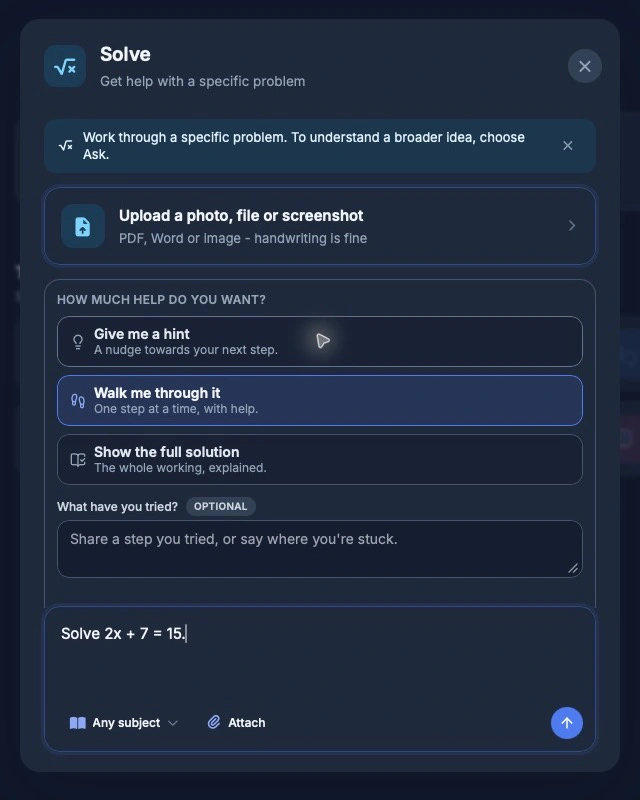
PocketTutor's Solve mode lets the student choose from three support levels: “Give me a hint”, “Walk me through it” and “Show the full solution”. The student can choose a nudge, help one step at a time or a full worked solution. The three labels were checked in the live app on 2 November 2026: https://app.pockettutor.io/. They choose the support and remain responsible for their own work and authorship. Practice asks a question and responds to the student's attempt, while Check gives feedback on the student's own work. Use these tools within the task's permitted conditions: https://getpockettutor.com.au/modes and https://getpockettutor.com.au/learn/for-parents/ai-tutor-vs-chatgpt.
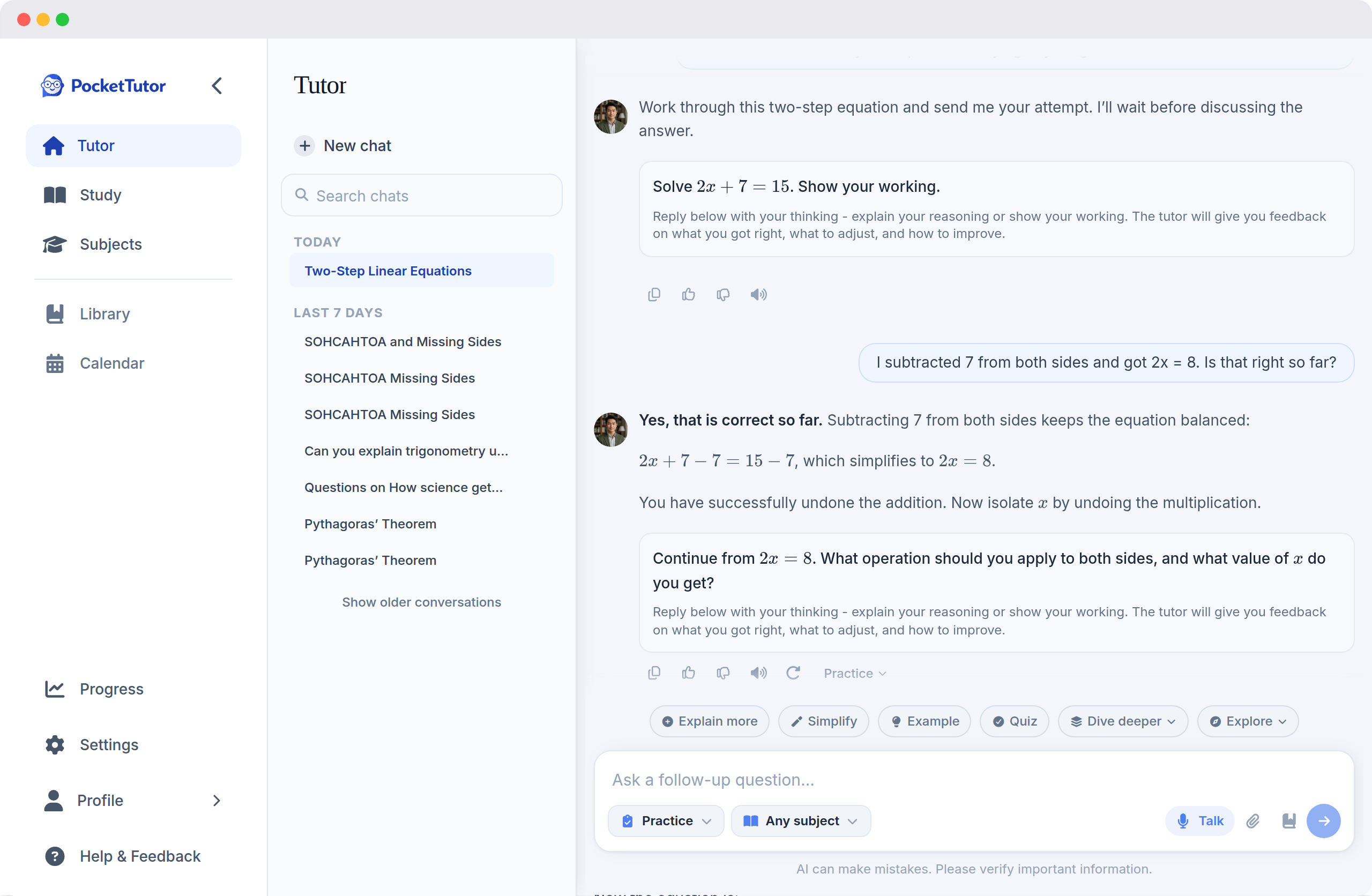
For an allowed practice activity, a parent might ask the student to try the method before opening a worked explanation, then attempt another question independently. For permitted feedback, the student can decide how to revise their own paragraph and explain why. PocketTutor's student-facing guide covers retaining authorship: https://getpockettutor.com.au/learn/for-students/ai-homework-without-cheating.
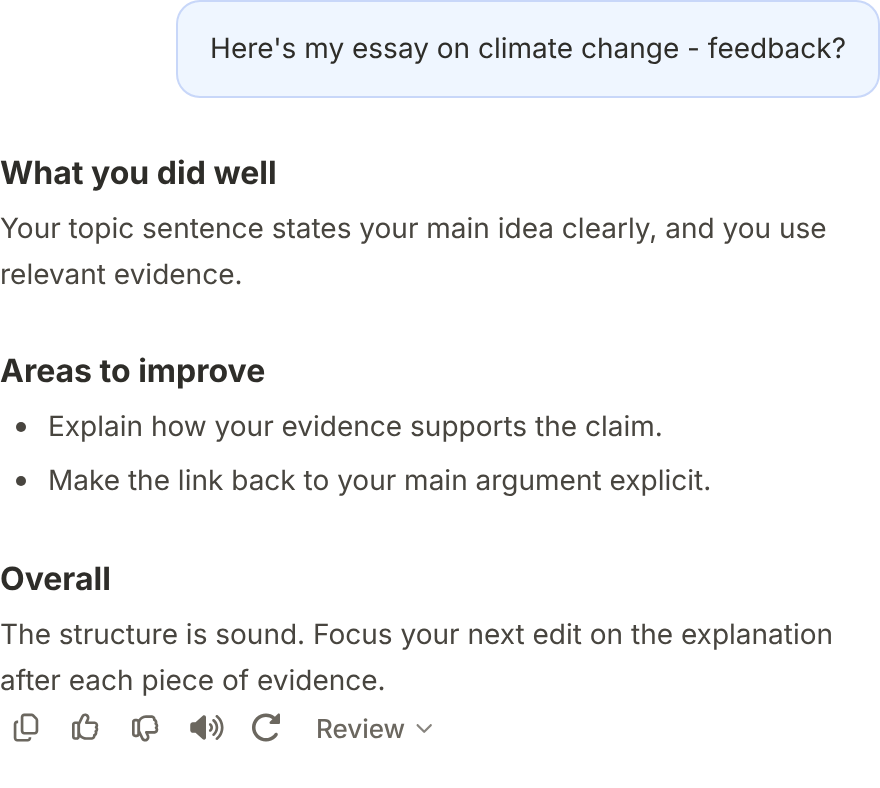
AI can make mistakes. Compare important explanations with class notes, prescribed texts or a teacher, and leave assessed work within the authorised conditions. PocketTutor does not claim that its tools prevent cheating.
Check understanding through conversation
Begin with the topic rather than a suspicion. Ask your child what they were trying to understand and where they found the explanation helpful or confusing. Let them show their own working and talk through a decision they made.
Keep genuine drafts when the task requires them. Looking at how an argument or method developed can prompt a useful discussion about feedback, but a file history is not proof on its own. Ask what changed and why, rather than treating every edit as something to justify.
PocketTutor's parent dashboard shows study activity and progress information, including modes used and quiz information. It does not give parents full chat transcripts. The dashboard cannot establish whether a submitted assignment meets its authorship conditions: https://getpockettutor.com.au/parents and https://getpockettutor.com.au/learn/for-parents/is-ai-tutoring-safe-for-children.
Use any dashboard information to begin a discussion. A child who spent time in a particular mode may still need help explaining a topic. Conversely, you do not need to turn every session into an inspection. Agree on what to check together and when to ask the teacher.
A few questions to ask together
These questions are prompts for a conversation, not an interrogation:
- “What does the task sheet say about getting help?”
- “Which part were you trying to understand?”
- “Can you show me your thinking before and after the feedback?”
- “Is there anything we should ask your teacher before you continue?”
If AI has already been used and your child is unsure whether it was allowed, pause further use and ask the teacher how to proceed. Describe what happened accurately. Avoid deleting or changing records to hide it, and do not assume an acknowledgement added at the end will resolve the issue.
Frequently asked questions
Is asking AI for feedback on my child's draft allowed?
It depends on the task. Ask whether feedback, editing or planning support is permitted and how it should be recorded. Even when feedback is allowed, the student must stay within the specified authorship conditions.
Does acknowledging AI make its use acceptable?
Only if the use was permitted in the first place. Acknowledgement addresses disclosure, while the task's conditions address what assistance may be used. Follow the teacher's required format and keep any requested records.
Are AI rules the same in every Australian state?
No. The table links different authorities with different scopes, and school policies and individual task instructions also matter. Start with your child's course and the relevant school policy rather than applying a rule from another certificate.
Can my child use AI for an exam?
Do not assume so. Read the examination conditions and ask the school about the specific exam. Permission to use an app for home revision does not mean it can be used during an examination or controlled assessment.
Can the parent dashboard show that work is original?
It shows information about activity within the product, not an independent authentication of a submitted assignment. Discuss the student's work and follow the teacher's checkpoints. The dashboard cannot replace the school's assessment process.
What should we do when the instructions are unclear?
Ask the teacher before using the tool, describing the specific help the student wants. Keep the response with the task instructions and follow any limits or acknowledgement requirements. Choose a permitted way to continue while waiting for clarification.
Read how PocketTutor supports student practice at https://getpockettutor.com.au/parents. Where the school's rules permit it, you can try the free plan without a credit card at https://getpockettutor.com.au.
Sources
- https://app.pockettutor.io/ - checked 2 November 2026. Exact support-choice labels and a new guest-demo screenshot; no account or student data used.
- https://www.nsw.gov.au/education-and-training/nesa/hsc/2027-rules-and-procedures/artificial-intelligence - checked 2 November 2026. Resolved destination of the original HSC AI link, with 2027 rule context and detector guidance.
- https://www.nsw.gov.au/education-and-training/nesa/news/all/new-take-home-assessment-rules - checked 2 November 2026. Notice published 31 August 2026, including commencement dates and exempt courses.
- https://vcaa.vic.edu.au/administration/vce-administrative-handbook/scored-assessment - checked 2 November 2026. VCE scored assessment and authentication.
- https://www2.education.vic.gov.au/pal/generative-artificial-intelligence/guidance/promoting-academic-integrity - checked 2 November 2026. Victorian government-school task guidance.
- https://www.qcaa.qld.edu.au/about/k-12-policies/artificial-intelligence - checked 2 November 2026. Official guidance hub.
- https://www.qcaa.qld.edu.au/downloads/p_10/factsheet_ai_guidance_students.pdf - checked 2 November 2026. Student and parent guidance, February 2024.
- https://www.qcaa.qld.edu.au/senior/certificates-and-qualifications/qce/eligibility-requirements/academic-integrity-requirement - checked 2 November 2026. QCE requirement and accepted formats, including exemptions.
- https://www.sace.sa.edu.au/en-US/teaching/assessment/integrity/guidelines/ai-faqs - checked 2 November 2026. Current SACE AI assessment guidance, replacing the unavailable beta page.
- https://scsa.wa.edu.au/__data/assets/pdf_file/0018/1232028/_WACE-Manual-2026-April.pdf - checked 2 November 2026. WACE Manual version 2, 17 April 2026, sections 2.3.1 and 2.6.
- https://www.tasc.tas.gov.au/academic-integrity-guide-for-students/ - checked 2 November 2026. TASC course guidance.
- https://www.bsss.act.edu.au/__data/assets/pdf_file/0007/612871/BSSS_Parent_Guide_-_AI_and_Academic_Integrity_2026.pdf - checked 2 November 2026. BSSS 2026 parent guide, corrected full URL.
- https://education.nt.gov.au/__data/assets/pdf_file/0010/1567891/generative-artificial-intelligence-guidelines.pdf - checked 2 November 2026. NT guidance dated 28 October 2025, section 4.2 on NTCET.
- https://www.education.gov.au/schooling/resources/australian-framework-generative-artificial-intelligence-ai-schools - checked 2 November 2026. Shared school AI guidance.
- https://getpockettutor.com.au/modes - checked 2 November 2026. Mode descriptions.
- https://getpockettutor.com.au/learn/for-parents/ai-tutor-vs-chatgpt - checked 2 November 2026. Worked methods, practice and feedback.
- https://getpockettutor.com.au/learn/for-students/ai-homework-without-cheating - checked 2 November 2026. Authorship and school conditions.
- https://getpockettutor.com.au/parents - checked 3 November 2026. Parent dashboard.
- https://getpockettutor.com.au/learn/for-parents/is-ai-tutoring-safe-for-children - checked 3 November 2026. Parent visibility and AI limitations.
- https://getpockettutor.com.au - checked 2 November 2026. Free-plan CTA.
- https://getpockettutor.com.au/screenshots/learn-practice-turn-light.webp - checked 2 November 2026. Existing public demo practice image.
- https://getpockettutor.com.au/screenshots/chat-review-light.webp - checked 2 November 2026. Existing public demo feedback image.

